How to make a music video with Claudia
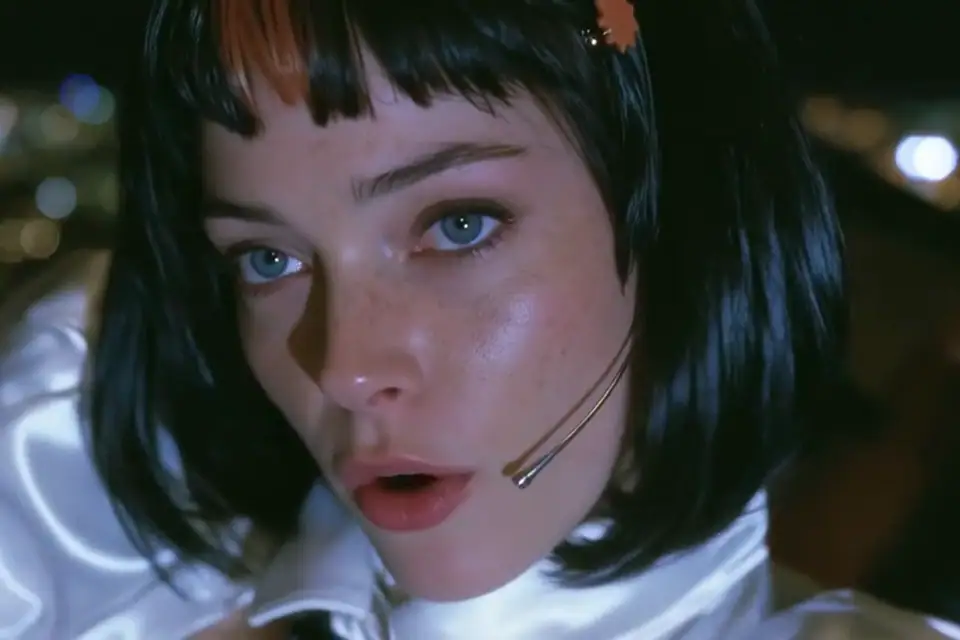
TL;DR: Claudia is an open character. The song comes first, then a timed vocal map, a board that follows the words, 16:9 plates, target-audio motion and a deliberate cut. The final music video is 9:32, 16:9 and lip-synced. Every singing shot was checked against the real vocal. The cheap route is H3 Max Turbo with the vocal stem pinned as target audio. Omni 1.1 has stronger motion, but it does not take my song as target audio. Every version, including the bad ones, is below. The card explainer is now the room version, not the draft.
What this is
I made a music video for my track "I'm Not a Rave Girl" with Claudia, the open character from claudia.gallery. This post is the whole route, the versions that worked and the versions I rejected. It is also the working brief for the next video.
The final film is 9:32, 16:9, cut on the words and lip-synced to the real vocal. The route is reproducible. It is not cheap if you want motion everywhere, and it is slow if you check lip sync properly.
Who Claudia is and what you may do
Claudia is a singer with seven films behind her. She has a glossy black bob, one clay streak through the bangs, a star clip and a headset mic. Her clothes change with the world. Her head does not.
The canon is machine-readable. Call claudia_canon on the public MCP before making anything. It returns the fixed identity text, every look, her voice and manner, the never-list and the release norms. build_prompt writes a Midjourney prompt with the correct framing and identity block. search_images, get_image, get_guide and plan_film cover the rest.
Anyone may use her. Release under your own artist name. Leave "feat. Claudia" out of the artist field. Credit her in the description and on the cover with "Claudia is an open character by anabology (claudia.gallery)". If the work is AI-made, say so.
What the models can and cannot do
I tested two models on the same frame and the same lyric.
Gemini Omni 1.1 Flash produced the best face and camera motion of the two tests. It also invented its own voice, sang the line correctly and stayed on model. The problem is that it does not accept my vocal as target audio. Its mouth follows its own generated take, not my song.
H3 Max accepts target_audio_url. I cut my real vocal stem, pinned it and told the model to follow it. The output soundtrack matched the stem and the mouth followed the words. The final production route is H3 Max Turbo with target audio. It costs half of H3 Max and keeps the same control.
The trade is quality. Omni looked better in the test. H3 looks more like a talking portrait. Correct sync wins.
Start with the song and a vocal stem
No storyboard before the audio. You need the exact timing first.
- Run
ffprobeon the track for duration, codec, sample rate and channels. - Keep a lossless mono copy for transcription.
- Transcribe with word timestamps.
- Split vocals and instrumental with Demucs.
- Check the vocal stem against the master. It must have the same length and zero lag.
- Fix the transcript by hand where it hears "rave" as "rape" or "rape girl".
The transcript is a timing tool, not a lyric sheet. Correct it before it reaches a board, a caption or a prompt.
Build a board that follows the words
The old mistake was cutting on a fixed timer. A section with seventeen words got one shot, a two second gap got six. The picture had no reason to change.
Make one event per sung line or phrase. Put a cut only where the voice changes. Fill the gaps with action that belongs to the line before or after it.
My board:
rave exit
sings: not a rave girl
coffee
journaling
sings: easy weekend
reading
plants
thrift shop
sings: you know
records
park
flowers
sunset picnic
cooking
sings: the key never left
The story is a refusal and a weekend. Every scene answers one of the two.
Make 16 by 9 plates first
Every plate is 16:9. No portrait plate unless the whole film is portrait. A vertical image in a wide film becomes a narrow strip and blurred bars, and it breaks the rhythm.
Use the canon identity block in every prompt. Give her adult wording, the exact streak side and the star clip side. Ask for the action, not a mood poster. A useful plate has hands doing something, a face at camera distance and a clear place.
I generated the room and weekend plates with Nano Banana Pro from a reference face. Six plates passed and six failed the first check. The failures were identity drift, cropped faces and unreadable action.
Animate with target audio
Take the shot window from the vocal stem. Cut exactly that window. Pad it to at least two seconds. Upload it as target_audio_url.
The prompt has one job. Describe the scene, the camera and the fact that her lips follow the target word for word. Do not ask for another song. Do not describe the lyric as text on screen.
scene: Claudia at the kitchen window, coffee in hand
identity: canon short form
audio: real vocal stem, shot window only
camera: slow push in
mouth: follow target audio exactly
resolution: 480P or 768P
duration: shot window plus 0.4 s
H3 output can be about 0.7 seconds longer than requested. Normalize and trim every clip back to the board duration before the edit.
Check lip sync with the real audio
A moving mouth is not lip sync.
- Watch the clip at full speed with the real vocal.
- Transcribe the output with Whisper and compare the words.
- Check the first and last mouth shape against the first and last phoneme.
- Check the mouth returns to rest in every silence.
- Check that the mouth stays visible for the whole line.
The H3 test passed the word check and the mouth rested when my four second vocal ended. The first card draft did not pass as a talking demo because it used still images and a fixed presenter circle. The room version below replaced it. Every talking clip was checked against the actual voiceover.
Cut the picture, not the song
Lock the song first. The final edit keeps one audio track, never the model soundtracks.
Hard cuts. No crossfades on vocal edits. A cut lands on a new word, a breath or a drum hit. A cutaway during a line is allowed, but the next shot must return before the next word.
Subtitles get their own pass after picture lock.
Subtitles without a black box
My first subtitles had a dark box. It covered her chin and mouth. The fix is smaller type on the bottom edge, with a black outline and no box.
Rules:
- bottom safe margin
- one or two short lines
- 20 px at 480p, scale with the master
- white fill, black outline
- no box, no background panel
- never cover the mouth or the hands doing the action
- top placement only for a low-angle shot with an empty top edge
Every version
The final cut. 9:32, 16:9, small box-free subtitles. Every lyric shot was reviewed. Wide, back-turned and closed-mouth takes were replaced with frontal performance takes. This is the version to judge.
The same final without subtitles.
The 2:33 weekend edit with subtitles. This was the first cut that followed the words instead of a timer.
The same 2:33 edit without subtitles.
The fast cut. 53 cuts, more energy, more repetition and a black subtitle box.
The animatic. Stills only, but the timing is exact. Useful as a board test, not as a finished video.
The Omni 1.1 Flash test. Best motion of the tests, native voice, no target audio.
The H3 Max test. Real vocal pinned as target audio, my music over it.
The card explainer. Claudia sits on a chair in a room, talks to camera and shows the screen flow beside her. The voiceover is new, the mouth was checked against that voiceover.
What failed
The animatic was not a video. Stills with a slow zoom look like a slideshow.
Fixed timing made random cuts. More cuts made it busier, not better.
Portrait sources ruined 16:9. Blurred side bars looked like an export error.
A black subtitle box covered the performance. Small outlined text below the chin works better.
Omni did not accept my song as target audio. A beautiful test can still be the wrong route.
A presenter circle over a screen recording works only when it covers the old webcam and leaves the UI alone. The first draft failed both.
What it costs
List prices on fal at the time of writing:
H3 Max Turbo, 480P        $0.01625 per second
H3 Max, 768P              $0.04 per second
Omni 1.1 Flash, 360P      $0.03 per second
Omni 1.1 Flash, 720P      $0.10 per second
Fabric lip sync           $0.08 per second
The final 9:32 can be built for about $10 with H3 Max Turbo target audio and existing plates. Omni at 720p is about $57 for the same length before retries.
Checklist before you publish
- canon identity on every plate
- all plates 16:9
- the song untouched
- one audio track in the master
- every line checked against the real vocal
- mouth visible for every line
- no black subtitle box
- no cutaway across a whole word
- cover has the credit
- description has the credit
- AI label if AI made it
- release under your own artist name
- phone playback check
- desktop playback check
What I do next
The card video was rebuilt with a room, a chair, a monitor and target-audio lip sync. The next step is real hardware: card, reader, phone tap and the PIN entry on the card itself. Then a full setup guide with the same checks.
Claudia is fun to build with. The model is not the director. The map, the board and the checks are.